

Cash Pickup & Money Transfer Powered by Ria®
Quickly transfer money to another person1 for pickup at Walmart or pickup yourself.2
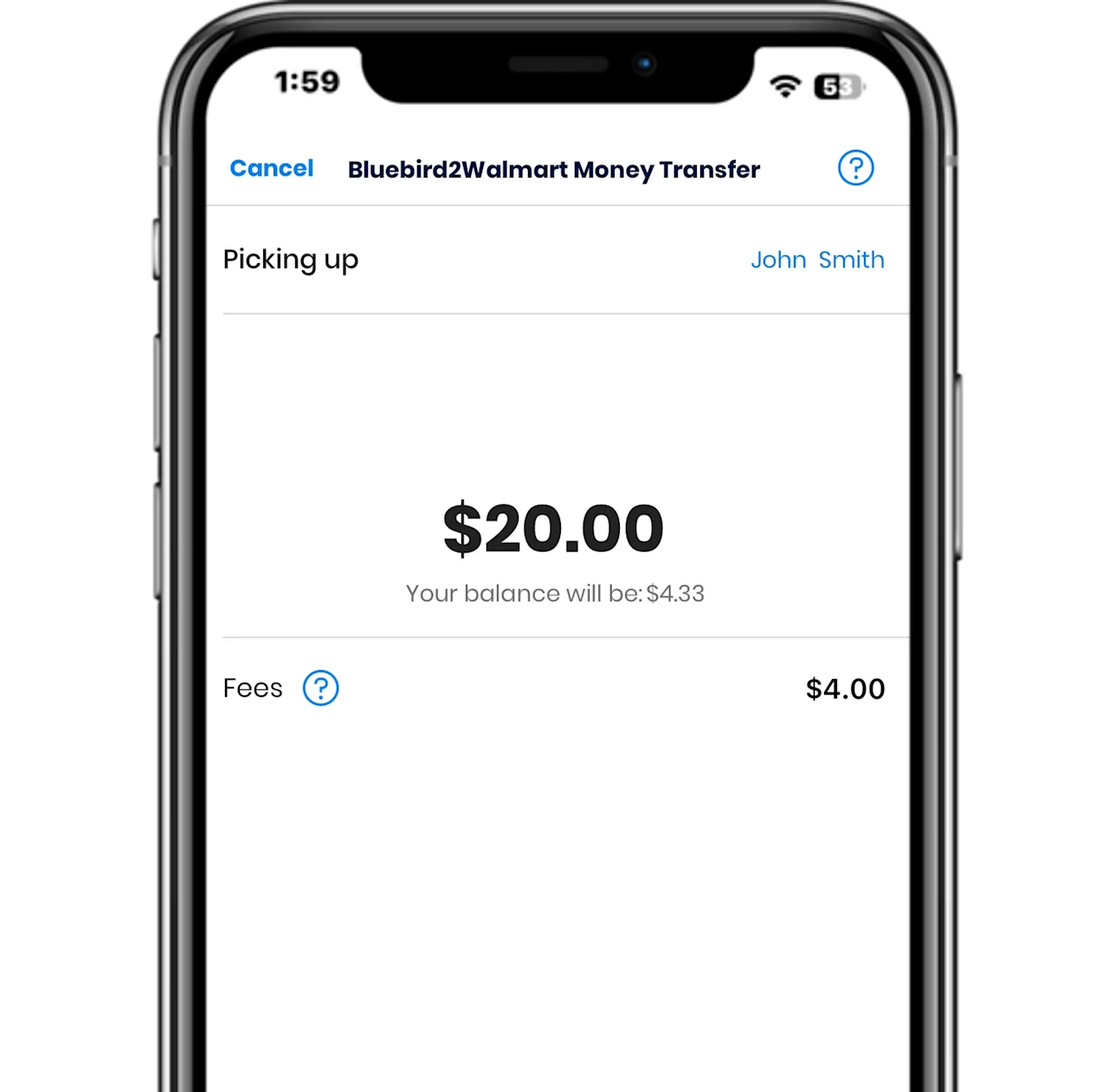
Conveniently withdraw & transfer cash
Cash Pickup2 & Bluebird2Walmart Money Transfer Powered by Ria®1 allow you to withdraw cash from your account for pickup by you or another person at any Walmart store located in the U.S. or Puerto Rico.

Here’s how to use Ria® for cash pickup2:
-
Log in
Log in to your Bluebird account, go to Money Out, and select Cash Pickup Powered by Ria.
-
Select amount
After selecting Bluebird Cash Pickup, confirm your name and address on file and enter the amount of cash you’d like to withdraw.
-
Confirm & pickup
Confirm your amount and then go to a Walmart MoneyCenter or customer service center with a government issued ID and the pickup Reference Number.
Here’s how to use Bluebird2Walmart Money Transfer Powered by Ria® 1:
-
Log in
Log in to your Bluebird account, go to Money Out, and select Bluebird2Walmart Money Transfer Powered By Ria.
-
Select amount & recipient
Select Bluebird2Walmart Money Transfer, select the recipient you want to send money to, and enter the amount.
-
Confirm & send
Confirm the transfer and share the Reference Number with the recipient.
FAQs
-
Cash Pickup Powered by Ria allows you to withdraw cash from your Bluebird account for pickup at any Walmart store located in the U.S. or Puerto Rico. Bluebird Cash Pickup transactions are conducted by Ria in accordance with Ria's Terms of Service and Ria's Privacy Policy and are subject to the Bluebird® Bank Account's Deposit Account Agreement. Fees and limits apply.
-
Ria is a global leader in money remittances, specializing in both domestic and international money transfers (Note: Bluebird Cash Pickups are domestic only). Learn more about Ria.
Ria is a registered trademark of Continental Exchange Solutions, Inc. dba Ria Financial Services, licensed as a Money Transmitter by the Department of Financial Services of the State of New York; licensed by the Georgia Department of Banking and Finance, NMLS ID 920968, LICENSE NUMBER 18943; and authorized independently or through its affiliate, Ria Financial Services Puerto Rico, Inc. OCIF LICENSE NUMBER TM-031, to operate as a Money Transmitter in all United States' jurisdictions where it conducts business.
-
To submit an order, follow these steps:
Log In to your Bluebird account.
Go to Money Out then select Cash Pickup Powered by Ria.
Select Bluebird Cash Pickup and confirm the name and address on file for your Bluebird account is accurate. Note: You can always update your address by going to My Profile. If you need to update your name, please contact Customer Service.
Enter the amount of cash you’d like to withdraw, confirm and send your order. Make note of your Reference Number - you will need to present it when you pick up your cash at Walmart.
Once you submit your order, the Withdrawal and Fee amounts will be deducted from your Available Balance and your money will be ready for pickup in as little as 5 minutes. Daily limits apply.
-
Go to a Walmart MoneyCenter or customer service desk at any Walmart store* and provide the following to the Walmart store associate:
Your government-issued photo ID**
The pickup Reference Number. You can locate this number in any of the following ways:
The confirmation page at the time you submitted your order
The confirmation email sent to the email address associated with your Bluebird account
In certain states, you may also need to provide your occupation and Social Security Number or ITIN at the time of pickup.
*If you're a resident of Minnesota, you will only be able to pick up money from a Walmart location in the state you designated when you initiated the transaction.
**You will be required to provide proof of address if your ID does not contain your address (e.g. a passport) or contains a P.O. Box. See “What is an acceptable government-issued photo ID to present at Walmart?” below to see the list of permissible IDs and proof of address documentation.
-
The ID presented to pick up your money at Walmart must:
Not be expired or damaged
Contain your photo
Be an acceptable ID type (see below) Note: Paper temporary IDs and digital IDs will not be accepted.
The following are the acceptable types of ID:
Driver’s License (US/PR)
State ID (US/PR)
US or International Passport
Military ID
US Permanent Resident Card
Tribal ID
Matricula Consular
If your ID does not contain your address (e.g. a passport) or contains a P.O. Box, you will be required to provide proof of address. The following are acceptable proof of address documents, which must be in your name:
Pay Stub
Bank Statement
Property or Municipal Tax Statement
Automobile Insurance Policy
Voter Identification
Internal Revenue Tax Forms (W-2, Form 1099, ITIN)
Rental/Lease Agreement
Bills (Utility, Cellular/Telephone, Mortgage, Credit Card, Auto Loan)
Printed Personal Check
-
The Cash Pickup fee depends on the withdrawal amount and is deducted at the time you submit an order. See below for a schedule of fees:
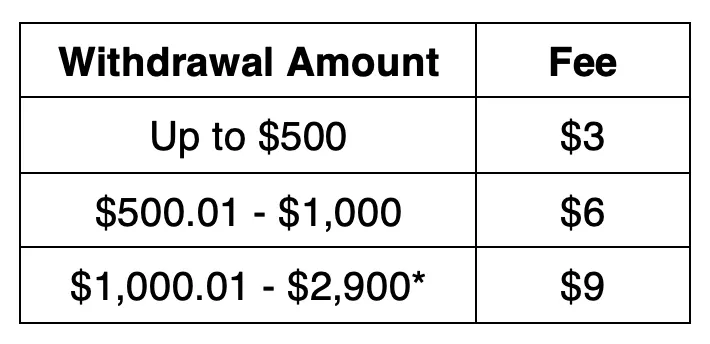
*Cash Pickup withdrawals greater than $2,500 are available to Bluebird accountholders who receive their tax refund or refund advance via Direct Deposit into their Bluebird accounts.
-
A daily withdrawal limit of $2,500 applies for each Bluebird account held, and a cumulative $2,900 daily limit applies across all your Bluebird accounts.
If you Direct Deposit a tax refund or refund advance to your Bluebird account, the daily Cash Pickup withdrawal limit will be equal to your remaining amount of tax funds, but no greater than $2,900, until the remaining tax funds amount is $2,500 or less. At that point, the $2,500 daily Cash Pickup withdrawal limit applies. The increased tax funds limit expires at the end of the calendar year in which the tax funds were Direct Deposited into your Bluebird account.
-
You can cancel a pending Cash Pickup order by logging into your Bluebird account and clicking or tapping View all transactions from your main account. Select the Cash Pickup transaction and then click or tap Cancel.
Note: You have 21 days from the date you submit your order to pick up your money. After 21 days, the order will be cancelled and the Withdrawal and Fee amounts will be returned to your Bluebird account.
-
No, Subaccount users cannot use these features.
-
Cash Pickup Powered by Ria allows you to withdraw cash from your Bluebird account for pickup at any Walmart store located in the U.S. or Puerto Rico. Bluebird Cash Pickup transactions are conducted by Ria in accordance with Ria's Terms of Service and Ria's Privacy Policy and are subject to the Bluebird® Bank Account's Deposit Account Agreement. Fees and limits apply.
-
In order to use the Cash Pickup or Bluebird2Walmart Money Transfer service, you must be a registered Bluebird accountholder and you must have completed email verification.
Please note, only main accountholders can access the Cash Pickup or Bluebird2Walmart Money Transfer service(s); subaccount users do not have access.
-
To send a Money Transfer, follow these steps:
Log In to your Bluebird account.
Go to Money Out then select Bluebird2Walmart Money Transfer Powered by Ria.
Select Bluebird2Walmart Money Transfer and select the recipient you want to send money to or add a new recipient. Note: You may be required to provide US-issued driver’s license or state ID information and occupation prior to sending your first Money Transfer.
Enter the amount of money you’d like to transfer, confirm and send your Money Transfer. Make note of the Reference Number - you will need to share it with your recipient to present when they pick up the cash at Walmart.
Once you submit your Money Transfer, the Transfer and Fee amounts will be deducted from your Available Balance and your money will be ready for pickup at Walmart in minutes.
-
You can send a Money Transfer to anyone over the age of 18. Your recipient does not need to have a Bluebird account. Note: You cannot send a Money Transfer to a business or to yourself.
-
Your recipient can go to any Walmart store*, visit the MoneyCenter or customer service desk, and provide the following to the Walmart store associate:
A valid government-issued photo ID**
The pickup Reference Number, which you’ll need to share with your recipient. It can be found in any of the following ways:
On the confirmation page at the time you submitted your Money Transfer
On the confirmation email sent to the email address associated with your Bluebird account
In certain states, your recipient may also need to provide their occupation and Social Security Number or ITIN at the time of pickup.
* If you're a resident of Minnesota, the recipient will only be able to pick up money from a Walmart location in the state you designated when you initiated the transaction.
** Paper temporary IDs and digital IDs will not be accepted. If your recipient’s ID does not contain their address (e.g. a passport) or contains a P.O. Box, they may be required to provide proof of address. Scroll down for more information.
-
Once you submit your Cash Pickup / Money Transfer request, the cash will be ready for pickup in as little as 5 minutes. Daily limits apply. Cash Pickup orders can be picked up during Walmart store hours (typically 8:00 a.m. to 8:00 p.m. Monday through Saturday and 10:00 a.m. to 6:00 p.m. Sunday, but hours may vary). For Walmart store locations and hours, visit www.Walmart.com.
-
You/the recipient have 21 days from the date you submit the Cash Pickup / Money Transfer request. After 21 days, it will be cancelled and the Withdrawal/Transfer and Fee amounts will be returned to your Bluebird account.
-
The Money Transfer fee depends on the transfer amount and is deducted at the time you submit the Money Transfer. See below for a schedule of fees:
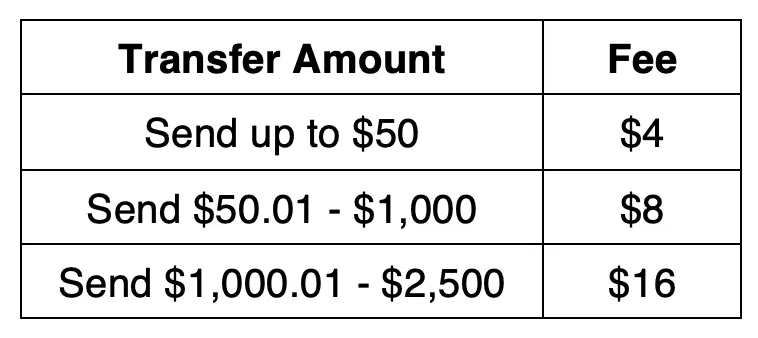
You can transfer up to $2,500 per day combined for all of your Bluebird accounts.
-
You can cancel a pending Money Transfer by logging into your Bluebird account and clicking or tapping View all transactions from your main account. Select the Money Transfer transaction and click or tap Cancel.
Note: Money Transfers not picked up within 21 days will be automatically cancelled and the Transfer and Fee amounts will be returned to your Bluebird account.
-
Contact Bluebird® Bank Account Customer Service by calling 1-833-926-3922.